Pages

Tuesday, February 9, 2010

Nokia E71 review- perfect choice for you

Nokia E71 is the phone inherited strengths of the model with QWERTY keyboard as E61, E61i go ahead with good design with excellent features of the royal series E.
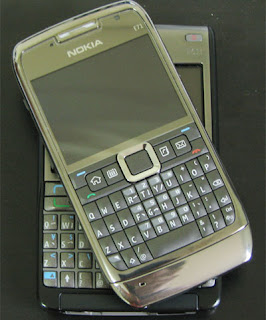
Nokia E71 review-  pefect choice for you
Design

This is a good design about nokia series E. The shell is made of chrome machine, easy to leave fingerprints and looks very solid. In the middle selection key is also the message light. So, when you have a call or message or any work missed border around the keyboard has white light will blink continuously until you leave to the event or until time out message missed you built. This is a good way to help reduce the discomfort to the missed warning light on the device precursor. It is without flaw since thinness of this machine because it makes us a touch surprised, really is. Especially when all the modern features are integrated on it. It is also worthy of a rival product its RIM BlackBerry Bold - the device in the shape of giant when compared to Nokia E71. Anyone will be Left near it because Nokia does not omitted any features on the device super slim and compact this:

Display:


E71's screen resolution 320 × 240 pixels are sharp. Not be as bright display of Nokia N95 but not in and eyestrain, easy to use and more comfortable than N95. Photos and movies are shown in detail and definition. Contrast media stability and the performance you will appreciate this screen when loading and browsing some sites seriously.


Connectivity:


World is permanently changed. Remember that once held all nokia features you need for a perfect phone. We're not sure this device supports 2100 MHz band or not, and if you do not support the version will support this band in European countries and America. About connectivity, the Nokia E71 supports networks GSM / GPRS / EDGE 4 band: 850MHz/900MHz/1800MHz/1900MHz UMTS / HSDPA support, wireless connectivity: Wi-Fi 802.11 a, b, g, Bluetooth 2.0, and GPS.

Sound:

Like the E61 and E61i, Nokia E71 has a loudspeaker located above the rear hull. E71 sound of larger, more than E61, and report the call bell and message very clearly. Music heard on E71 but not pretty or perfect as missing Bass and Bass heard a speaker slot while all sizes. However, sound very large, so you can rest assured that it will make you pop up out of bed each morning there.

Messages:

If missing features email, messaging, the auction can call the Nokia series E! In addition to support universal use a POP3/IMAP protocols, Nokia's Mail for Exchange also has an external device extremely easy to setup and use. This feature supports BlackBerry Connect and the connection we also see a symbol of Goodlink service. Messaging applications also supports instant messaging more. E-mail text and display better for reading and editing. We enjoyed the devices that support protocols for HTML email.


Keyboard:

This is not necessarily a brackish sea at the Nokia E71. E61 keypad E71 similar but much smaller, the keyboard is not too soft, beautiful and easy to press when you are happy hands. The matter is in the design of Nokia QWERTY keyboard, unlike the conventional QWERTY keyboard that Nokia keys Z is back to just below the key A, while the normal QWERTY keyboard keys are located below the Z key or the bottom of the S A key and S. This makes you vulnerable to type without looking at the wrong keyboard. However, if you're familiar with the QWERTY keyboard of the Nokia E-series is also not the major problem but the lack of travel outside the border surrounding the keyboard cause slippery while using this keyboard. Beautiful light display and keypad easy to read. Like other models, the key will not light, but only characters and symbols light up looks very clean and attractive.


Now located in this attractive features intelligent guess from the draft message. You'll never think you need this feature when a QWERTY keyboard but it actually helps you type faster than many know. This is a similar feature on the iPhone. If you type fast and unfortunately make mistakes but from a type and press space, this feature will help you type is correct this. It can also save the time of drafting suggestions from you when you are reluctant and do not know what type you just simply press space to select from the guess and continue typing Left


Expandable

Memory microSD USB plug just above the side hull you can expand the memory as possible. Since no conditions to check the speed data transmission via USB but is probably equivalent to other devices from Nokia.


Call quality:

Nokia names associated with the call quality like from the Hamburger Ham and Burger so! Clear and very sweet language. Nokia E71 has very good call quality. We tried calling a few random calls to check the quality of the call. In all this, it will reach even beyond our expectations with Nokia. The phone was beyond the role of a phone. This necessarily would be horizontal competitors financial health across the BlackBerry Curve as it has both features start signal in areas with poor signal. And all of you who love to Blackberry will have to mind it when they know that RIM will strive to feature the Nokia's mobile radio equipment on their own.

Pin:

Using BP-4L battery with 1500mAh capacity, with a whole day to use a full capacity to see the e-mail constantly, listening to calls, web surfing and messaging, on-screen display has also outlined two batteries. Battery life means nothing here to complain.


Overview:

We are really impressed with this new phone from Nokia. Many interesting features are integrated in it. As we, this is the best of Nokia devices as this time. Inevitably are. The device will be competition by other manufacturers by design, features, size, and it is a user pick and choose equipment.


You can find to buy this Amazon: Nokia E71 Unlocked Phone with 3.2 MP Camera, 3G, Media Player, GPS, Wi-Fi, and MicroSD Slot--U.S. Version with Warranty (Gray) or using some application and game for E71 at here


Introducing Google Buzz for mobile: See buzz around you and tag posts with your location.

Today we announced Google Buzz, a new product that integrates with your Gmail inbox and makes it easy to start rich conversations about the things you find interesting. Google Buzz lets you share web links, photos, videos, and more with those who are important to you. Rather than simply creating a mobile version of Buzz, we decided to take advantage of the unique features of a mobile device - in particular, location. We go through many experiences when we're on the go, and while there are lots of ways to share these experiences with your friends or even the world, there isn't always an easy way to let your audience know where you are when you post. Your location brings valuable context to the information you share. For example, does "Delicious dinner!" mean you're at a great restaurant, or that you had a wonderful home-cooked meal? Your mobile phone, which is with you almost all the time, can help answer these questions.

Google Buzz for mobile allows you to post buzz and keep up with your friends when you're away from your computer. It also uses your location to identify places around you. You can select one of these places and attach it as location tag to your posts, or read what others have posted about the place.

There are several ways to use Google Buzz on your mobile phone:
* Buzz.google.com: This web app provides access to Buzz from your iPhone or Android phone's browser, allowing you to view and create buzz messages. It has two different views: 'Following' view shows buzz from the people you follow, just like Google Buzz in your Gmail; 'Nearby' view shows public buzz that has been tagged with a location near you, and might be from people you don't follow. From Nearby view, you can also select a specific place from the list of nearby places and view posts attached to that place.

* Buzz on Google Maps for mobile: The new Buzz layer allows you to see buzz near you or anywhere on the map. You can post public buzz directly from the layer, and even attach a photo from your phone. Also, try visiting a mobile Place Page to read recent comments or to post buzz about that place. You can access Place Pages from the web app as well, by tapping on the place name in any location-tagged post.

* Buzz Shortcut from Google.com: You will see the buzz icon in the top right corner of the google.com homepage. Just tap on the icon to trigger the posting box.

* Voice Shortcut: The voice shortcut, which is available in the quick search widget on Android and in Google Mobile App on iPhone, allows you to post buzz without typing anything. Just say 'post buzz,' followed by whatever you'd like to post.


When adding location to buzz posts, we focused on places, not just a lat/long location or an address. We wanted to make location information more useful both to your followers and to help others discover information about nearby places. If you don't want to include your location when you post buzz, it's easy to exclude your location and post without it. You also control whether your buzz posts will be public or private - by default or for individual posts. While anyone can access your public posts, private posts are viewable only by the people you choose to share them with.

With Buzz for mobile, we hope you can start interesting conversations about places and be more spontaneous when you are out and about. How many times have you missed a fun event, even though it was nearby? Or a better choice of dessert, just because you didn't know about it? How often have you wondered "Where are you?" when reading a text message from a friend? Now, you can use Buzz to learn that there is going to be a movie night at your favorite park, share with the world that there is an awesome ice cream place right around the corner, or tell your friends about that delicious homemade lasagna.

To start using Buzz for mobile, go to buzz.google.com from your phone's browser. It is currently available for Android and iPhone, but we're working to bring it to other platforms. The Buzz layer on Google Maps for mobile is available on Android, Windows Mobile, Symbian, and iPhone (as web maps). Learn more in our Help Center.

Update @4:40PM : For Android users, buzz.google.com and shortcuts are currently available only for phones with Android 2.0+ and we're working to support other versions soon. Google Maps for mobile with Buzz (Maps 4.0) is available in Android Market for phones with Android 1.6+.

Saturday, February 6, 2010

Nokia E63 review - Smartphone cheap price with many good feature

Design and features nearly equivalent to Nokia E71, the E63 is the price for universal users by some equipment has been shortened.

Nokia E63 review - Smartphone cheap with many good feature
Smartphone has become a powerful trend in 2008, but higher price is a barrier to people with limited wallet approach, especially in time of economic crisis. E63 seems to be the smart answer of Nokia when the two meet, features and price.

Inherit the success of E71 - the most successful phone in the Nokia 2008 - E63 owners complete with modern features but is shortened in materials and equipment. Towards the universal use, the cheaper the price of E63 with E51 and E61i, but the feature is not worse.

Nokia E63 with the E71's design simplicity. Change is most easily recognized crust metal sure of "brother" go ahead now made of plastic. This design makes the machine compact and not sure, but more recent E63, and the hands held in the lagoon, easy input.

Put E63 next to E71, can recognize both the keyboard is relatively similar, but the model was split down the Ctrl and Chr, change the second is the shortened space bar. Buttons and soft, the icons do not differ much.

E63 has 2.36 inch wide screen resolution of 320 x 240 pixels, equivalent to E71. No camera angle on the call Monday to video. Behind the machine, 2-megapixel camera without auto focus mode (while E71 is a 3.2 Megapixel). However, E63 is an interesting point is the machine equipped with flash, the user can hold the space bar on your keyboard lights will light the torch just like the Nokia 1200.

Nokia E63 review - Smartphone cheap with many good feature

This is the first E-series equipped with 3.5 mm headphone jack, allowing users to use to listen to music with different types of headphone on the market.

The mobile has a full basic features of the smartphone. No more E71, Nokia just remove a few strategic equipment connection, camera to reduce the price of E61.

To save more, users can download data, web surfing via Wi-Fi simply. In addition, the machine also allows connectivity and music player with stereo audio via Bluetooth. E63 has no infrared connection.

Camera is 2 megapixel model, the mode does not support auto focus, a number of features for business people as photographed name card will not be. In return, the machine can flash the torch. Quality of the photos are not inferior to E71, except smaller.

Similar to E71, E-series phones run on the S60 operating system version 9.2, same interface. Installing applications simple software run faster. E63 integrated GPS like the E71.

Unpack E63 accessories, computer users will see a drop rather than multiple accessories like leather bag, strap, USB cable and DVD. Addition, the headset looks is inferior quality. Use standard computer battery BP-4L, use the normal features such as listening to calls, surf the web with your new 3 to 4 days


You can find to buy in Amazon here Nokia E63-2 Unlocked Phone with 2 MP Camera, 3G, Wi-Fi, Media Player, and MicroSD Slot--U.S. Version with Warranty (Ultramarine Blue)


Friday, February 5, 2010

The AdSense for Mobile Apps Team goes to Barcelona

This month is the annual Mobile World Congress in Barcelona, where the mobile industry gathers to present its latest innovations and the coolest new gadgets. As you may know, our CEO Eric Schmidt will be one of the keynote speakers this year, and we recently announced a special Android Developer Lab, as part of App Planet. In addition, I'm excited to let you know that the AdSense for Mobile Applications team will also be on the ground and answering questions. So if you're going too, keep an eye out for us!

AdSense for Mobile Applications
, which launched in beta last summer, allows you to place targeted text and image ads on your apps. The developer toolkit makes it easy to integrate the ads, and you can also filter out ads that you don't want to appear. We'll be hosting two informal sessions - February 16 at 9am and February 17 at 5:30pm - where you'll be able to talk to us face-to-face and ask any questions you may have. Space is limited to 25 people per session, so sign up soon if you'd like to attend.

See you in Barcelona!

posted by: Mike Schipper, AdSense for Mobile Apps team

Wednesday, February 3, 2010

Sony Ericsson Mobile Secret Codes

sony ericsson Secret Codes

ericsson T10 Secret Codes


*#06# for checking the IMEI (International Mobile Equipment Identity)

>*<<*<* for checking the firmware revision information (software release) >*<<*<*>> n-row text strings. if pressing yes you can check the phones text programming in currently selected language.
Shortcut for Last Dialed call menu Secret Codes

If you for some reason don't want to enter the 'Last Dialed calls menu' by using the 'YES' key you can use the following key
stroke instead: First '0' then '#'.

Access menu without Sim card

To access to the menu in your phone without having a card inside do the following: type **04*0000*0000*0000# When display say "Wrong Pin" press NO and you have access to the all menus: Info, Access, Settings, Calculator, Clock, Keylock On?, Mail, Phone book. NOTE if you try this on your phone may stop at Keylock On? menu and you´ll have to take your battery out to turn the phone on again. And this will not care about Phone lock!

A way to (un)lock your cell phone on to the network(subset):
1. Press <**< tac =" Type" fac =" Final" snr =" Serial" sp =" Spare">*<<*<* for checking the firmware revision information (software release) >*<<*<*> 1-row text strings. if pressing yes you can check the phones text programming in currently selected language.

>*<<*<*>> n-row text strings. if pressing yes you can check the phones text programming in currently selected language.
The Service Provider (SP) Lock Secret Codes

The Service Provider (SP) Lock menu is used to lock the cell phone to the SP's SIM card. Once the cell phone is locked to a specific operator, if one inserts a SIM card from a different operator the phone will refuse to accept it! The cell phone will however accept another SIM card from the same operator.

To activate/deactivate this lock one needs a special secret code that is not available to the end user.

Here is how to activate the menu for ericsson:

<**<>*<<*<* for checking the firmware revision information (software release) >*<<*<*> 1-row text strings. if pressing yes you can check the phones text programming in currently selected language.(298 entries)

>*<<*<*>> n-row text strings. if pressing yes you can check the phones text programming in currently selected language.(160 entries?)

The Service Provider (SP) Lock menu is used to lock the cell phone to the SP's SIM card. Once the cell phone is locked to a specific operator, if one inserts a SIM card from a different operator the phone will refuse to accept it! The cell phone will however accept another SIM card from the same operator.

To activate/deactivate this lock one needs a special secret code that is not available to the end user. (not even to you... or is it ? in case please let me know!)

<**<>*<<*<* for checking the firmware revision information (software release) >*<<*<*> 1-row text strings. if pressing yes you can check the phones text programming in currently selected language.(298 entries)

>*<<*<*>> n-row text strings. if pressing yes you can check the phones text programming in currently selected language.(160 entries?)
The Service Provider (SP) Lock Secret Codes

The Service Provider (SP) Lock menu is used to lock the cell phone to the SP's SIM card. Once the cell phone is locked to a specific operator, if one inserts a SIM card from a different operator the phone will refuse to accept it! The cell phone will however accept another SIM card from the same operator.

To activate/deactivate this lock one needs a special secret code that is not available to the end user.

Here is how to activate the menu:

<**<> key for a second or two The option Menu size turns up Choose 'yes' and go from there.

An alarm clock turned up too but it never rang. I think this was because there is no clock in the phone.
Free phone calls using the GA628

This trick has only been reported working on PREPAID GSM CARDS and in some countries and with some sw versions.
The prepaid GSM SIM CARD is a kind of "SIM card" which only has a sertant amount of credit on it (like a normal phonebox telecard)... if it can be traced? - we don't know...

Well..here's the trick you dial the no. normally and press YES. While "connecting" is shown on the screen, the following procedure should be carried out: Press CLR then 0 then # and then NO (twice) so as to switch OFF the phone. You can then still speak on the phone while it is switched off but the SIM card does not record your calls which will lead to FREE phone calls in some countries.. we hope!!

Another variant of the code Secret

Make a Call, while the phone says Connecting type 083# (the position 83 must be empty! ), when phone says Pos Emtpy, press the NO key and turn off the phone.

If you can make the call with the phone turned off you will face a problem when you need to hang up the phone...the only way for you to do that is remove the battery...???

Motorola Mobile Phone Secrets Codes

motorola secrets codes
Free Motorola Secrets Codes:
Motorola 920 Secrets Codes
---------------
Press menu and type one of these numbers and press OK:

11 = Status Review
13 = Available Networks
14 = Preferred Networks
22 = Select Keypad Tones
25 = Require SIM Card PIN
26 = Language Selection
32 = Repetitive Timer
33 = Single Alert Timer
34 = Set IN-Call Display
35 = Show Call Timers
36 = Show Call Charges
37 = Call Charge Settings
38 = Reset All Timers
43 = Reset All Timers
45 = Show Last Call
46 = Total For All Calls
47 = Lifetime Timer
51 = Change Unlock Code
52 = Master Reset
53 = Master Clear (Warning!! May result in deleting the Message Editor!!!)
54 = New Security Code
55 = Automatic Lock
63 = Battery Saving Mode

Free call tip

1 Enter the phone number
2 Enter OK
3 Type *#06#
4 Press Button C
5 And finally press the button for power off.

You should now be able to talk without being billed.


The 54# Tips Secrets Codes:

Type 1#, 2#........54# on the keypad (when you're not in the menu) to get the phone number used for with this key when speed dialing.


Motorola 930
--------------


Press menu and type one of these numbers and press OK:

11 = Status Review
13 = Available Networks
14 = Preferred Networks
22 = Select Keypad Tones
25 = Require SIM Card PIN
26 = Language Selection
32 = Repetitive Timer
33 = Single Alert Timer
34 = Set IN-Call Display
35 = Show Call Timers
36 = Show Call Charges
37 = Call Charge Settings
38 = Reset All Timers
43 = Reset All Timers
45 = Show Last Call
46 = Total For All Calls
47 = Lifetime Timer
51 = Change Unlock Code
52 = Master Reset
53 = Master Clear (Warning!! May result in deleting the Message Editor!!!)
54 = New Security Code
55 = Automatic Lock
63 = Battery Saving Mode

Free call tip

1 Enter the phone number
2 Enter OK
3 Type *#06#
4 Press Button C
5 And finally press the button for power off.

You should now be able to talk without being billed.


Motorola 930

The 54# Tip:

Type 1#, 2#........54# on the keypad (when you're not in the menu) to get the phone number used for with this key when speed dialing.


Motorola 6200 Secrets Codes
--------------
(Note: pause means the * key held in until box appears)
To activate RBS type: [pause] [pause] [pause] 1 1 3
[pause] 1 [pause] [ok]
You now have to press the [MENU] and scroll to the 'Eng
Field Options' function with the keys, and enable it.

De-activate RBS

To de-activate RBS type: [pause] [pause] [pause] 1 1 3
[pause] 0 [pause] [ok]
This only works with some versions of software.

These countries has been reported working:

UK (Orange)
AU

What's the use of RBS:

Get Distance From Base Station - Place a call, when it
is answered, press [MENU] until 'Eng Field Option' is
displayed, press [OK], select 'Active Cell', press [OK],
press [MENU] until 'Time Adv xxx' appears, where xxx is
a number. Multiply this number by 550, and the result is
the distance from the RBS (Radio Base Station), in
meters.

Get Signal Quality - press [MENU] until 'Eng Field
Option' is displayed, press [OK], select 'Active Cell',
press [OK], press [MENU] until 'C1' appears. This is the
signal quality. If it becomes negative for longer than 5
seconds, a new cell is selected.

Pin Outs

Numbered left to right, keypad up, battery down

1. Audio Ground
2. V+
3. True data (TD) (input)
4. Downlink - Complimentary data (CD) (input)
5. Uplink - Return data (RD) (output)
6. GND
7. Audio Out - on/off
8. Audio In
9. Manual Test - ???
10. Battery Feedback
11. Antenna connector


Motorola 7500
-------------


(Note: pause means the * key held in until box appears)
To activate RBS type: [pause] [pause] [pause] 1 1 3
[pause] 1 [pause] [ok]
You now have to press the [MENU] and scroll to the 'Eng
Field Options' function with the keys, and enable it.

De-activate RBS

To de-activate RBS type: [pause] [pause] [pause] 1 1 3
[pause] 0 [pause] [ok]
This only works with some versions of software.

These countries has been reported working:

IT (model: F16 HW: 5.2 SW: 2.1)


What's the use of RBS:

Get Distance From Base Station - Place a call, when it
is answered, press [MENU] until 'Eng Field Option' is
displayed, press [OK], select 'Active Cell', press [OK],
press [MENU] until 'Time Adv xxx' appears, where xxx is
a number. Multiply this number by 550, and the result is
the distance from the RBS (Radio Base Station), in
meters.

Get Signal Quality - press [MENU] until 'Eng Field
Option' is displayed, press [OK], select 'Active Cell',
press [OK], press [MENU] until 'C1' appears. This is the
signal quality. If it becomes negative for longer than 5
seconds, a new cell is selected.

Pin Outs
Numbered right to left, keypad up, battery down looking

1. Gnd
2. Pos
3. True data (TD) (input)
4. Complimentary data (CD) (input)
5. Return data (RD) (output)
6. Audio gnd
7. Audio out
8. Audioin


Motorola 8200 Secrets Codes
--------------
(Note: pause means the * key held in until box appears)
To activate RBS type: [pause] [pause] [pause] 1 1 3
[pause] 1 [pause] [ok]
You now have to press the [MENU] and scroll to the 'Eng
Field Options' function with the keys, and enable it.

De-activate RBS

To de-activate RBS type: [pause] [pause] [pause] 1 1 3
[pause] 0 [pause] [ok]
This only works with some versions of software.

These countries has been reported working:

ES, AU, NL, BE


What's the use of RBS:

Get Distance From Base Station - Place a call, when it
is answered, press [MENU] until 'Eng Field Option' is
displayed, press [OK], select 'Active Cell', press [OK],
press [MENU] until 'Time Adv xxx' appears, where xxx is
a number. Multiply this number by 550, and the result is
the distance from the RBS (Radio Base Station), in
meters.

Get Signal Quality - press [MENU] until 'Eng Field
Option' is displayed, press [OK], select 'Active Cell',
press [OK], press [MENU] until 'C1' appears. This is the
signal quality. If it becomes negative for longer than 5
seconds, a new cell is selected.

Pin Outs

Numbered right to left, keypad up, battery down looking

1. Audio Ground
2. V+
3. True data (TD) (input)
4. Downlink - Complimentary data (CD) (input)
5. Uplink - Return data (RD) (output)
6. GND
7. Audio Out - on/off
8. Audio In
9. Manual Test - ???
10. Battery Feedback
11. Antenna connector


Motorola 8400 Secrets Codes
-------------
(Note: pause means the * key held in until box appears)
To activate RBS type: [pause] [pause] [pause] 1 1 3
[pause] 1 [pause] [ok]
You now have to press the [MENU] and scroll to the 'Eng
Field Options' function with the keys, and enable it.

De-activate RBS

To de-activate RBS type: [pause] [pause] [pause] 1 1 3
[pause] 0 [pause] [ok]
This only works with some versions of software.

These countries has been reported working:

ES, AU, NL, BE


What's the use of RBS:

Get Distance From Base Station - Place a call, when it
is answered, press [MENU] until 'Eng Field Option' is
displayed, press [OK], select 'Active Cell', press [OK],
press [MENU] until 'Time Adv xxx' appears, where xxx is
a number. Multiply this number by 550, and the result is
the distance from the RBS (Radio Base Station), in
meters.

Get Signal Quality - press [MENU] until 'Eng Field
Option' is displayed, press [OK], select 'Active Cell',
press [OK], press [MENU] until 'C1' appears. This is the
signal quality. If it becomes negative for longer than 5
seconds, a new cell is selected.

Pin Outs

Numbered right to left, keypad up, battery down looking

1. Audio Ground
2. V+
3. True data (TD) (input)
4. Downlink - Complimentary data (CD) (input)
5. Uplink - Return data (RD) (output)
6. GND
7. Audio Out - on/off
8. Audio In
9. Manual Test - ???
10. Battery Feedback
11. Antenna connector


Motorola 8700 Secrets Codes
--------------
*#06# for checking the IMEI (International Mobile Equipment Identity)

Activate RBS

(Note: pause means the * key held in until box appears)
To activate RBS type: [pause] [pause] [pause] 1 1 3
[pause] 1 [pause] [ok]
You now have to press the [MENU] and scroll to the 'Eng
Field Options' function with the keys, and enable it.

De-activate RBS

To de-activate RBS type: [pause] [pause] [pause] 1 1 3
[pause] 0 [pause] [ok]
This only works with some versions of software.

These countries has been reported working:

AU, IT, SG, DE, ES, ZA

What's the use of RBS:

Get Distance From Base Station - Place a call, when it
is answered, press [MENU] until 'Eng Field Option' is
displayed, press [OK], select 'Active Cell', press [OK],
press [MENU] until 'Time Adv xxx' appears, where xxx is
a number. Multiply this number by 550, and the result is
the distance from the RBS (Radio Base Station), in
meters.

Get Signal Quality - press [MENU] until 'Eng Field
Option' is displayed, press [OK], select 'Active Cell',
press [OK], press [MENU] until 'C1' appears. This is the
signal quality. If it becomes negative for longer than 5
seconds, a new cell is selected.


Motorola CD 160 Secrets Codes
---------------


Press menu and type one of these numbers and press OK:

11 = Status Review
13 = Available Networks
14 = Preferred Networks
22 = Select Keypad Tones
25 = Require SIM Card PIN
26 = Language Selection
32 = Repetitive Timer
33 = Single Alert Timer
34 = Set IN-Call Display
35 = Show Call Timers
36 = Show Call Charges
37 = Call Charge Settings
38 = Reset All Timers
43 = Reset All Timers
45 = Show Last Call
46 = Total For All Calls
47 = Lifetime Timer
51 = Change Unlock Code
52 = Master Reset
53 = Master Clear (Warning!! May result in deleting the Message Editor!!!)
54 = New Security Code
55 = Automatic Lock
63 = Battery Saving Mode

Free call tips

1 Enter the phone number
2 Enter OK
3 Type *#06#
4 Press Button C
5 And finally press the button for power off.

You should now be able to talk without being billed.
ahahahhaaha......


Motorola CD 520 Secrets Codes
----------------

Press menu and type one of these numbers and press OK:

11 = Status Review
13 = Available Networks
14 = Preferred Networks
22 = Select Keypad Tones
25 = Require SIM Card PIN
26 = Language Selection
32 = Repetitive Timer
33 = Single Alert Timer
34 = Set IN-Call Display
35 = Show Call Timers
36 = Show Call Charges
37 = Call Charge Settings
38 = Reset All Timers
43 = Reset All Timers
45 = Show Last Call
46 = Total For All Calls
47 = Lifetime Timer
51 = Change Unlock Code
52 = Master Reset
53 = Master Clear (Warning!! May result in deleting the Message Editor!!!)
54 = New Security Code
55 = Automatic Lock
63 = Battery Saving Mode

Free call tips

1 Enter the phone number
2 Enter OK
3 Type *#06#
4 Press Button C
5 And finally press the button for power off.

You should now be able to talk without being billed.


Motorola d460 Secrets Codes
--------------


#06# for checking the IMEI (International Mobile Equipment Identity)

Activate RBS

(Note: pause means the * key held in until box appears)
To activate RBS type: [pause] [pause] [pause] 1 1 3
[pause] 1 [pause] [ok]
You now have to press the [MENU] and scroll to the 'Eng
Field Options' function with the keys, and enable it.

De-activate RBS

To de-activate RBS type: [pause] [pause] [pause] 1 1 3
[pause] 0 [pause] [ok]
This only works with some versions of software.

What's the use of RBS:

Get Distance From Base Station - Place a call, when it
is answered, press [MENU] until 'Eng Field Option' is
displayed, press [OK], select 'Active Cell', press [OK],
press [MENU] until 'Time Adv xxx' appears, where xxx is
a number. Multiply this number by 550, and the result is
the distance from the RBS (Radio Base Station), in
meters.

Get Signal Quality - press [MENU] until 'Eng Field
Option' is displayed, press [OK], select 'Active Cell',
press [OK], press [MENU] until 'C1' appears. This is the
signal quality. If it becomes negative for longer than 5
seconds, a new cell is selected.

Motorola V3688 Secrets Codes
---------------

#06# for checking the IMEI (International Mobile Equipment Identity)

Enhanced Full Rate Codec (EFR):

To Enable EFR press [][][] 119 [] 1 [] OK.
To Disable EFR press [][][] 119 [] 0 [] OK

NOTE: Nothing appears on Screen.

Secret Codes Of Nokia Mobiles

nokia secrets codesRead the Secret Codes for Nokia Mobiles phones:

Below we present secret codes of nokia mobile phones which are very useful for people who unlock phones and for amateurs of this topic. These special key sequences entered fromkeyboard of phone allow you to get some important information like IMEI number, release date, software version and much more. You can also choose default language, activatenetmonitor ect (Kode rahasia hp nokia).


1610/1630

*#170602112302# (software version code)

1610/1611

IMEI number code: -*# 0 6 #
Software version: -* # 1 7 0 6 0 2 1 1 2 3 9 2 #
Simlock status code: - # 9 2 7 0 2 6 8 9 #


2110

*#9999# (software version)

2110i/2110e

*#170602112302# or (depends on model)*#682371158412125# (software version)

NOKIA3110 Secret Codes

*#06# -IMEI

*#3110# -Software version

##002# - allows to turn off voice mail.

*#7780# - restore factory settings

*#746025625#(or *#sim0clock#) - to check if clock of sim (SIM-Clock) can be stopped (SIM-Clock-stop is akind of standby mode which saces battery)

*#92702689# (or *#war0anty#) -"warranty code:"- you have to enter one of the following codes:

6232 (OK)displays month and year of production date (ie "0198")

7332 (OK) - displays date of last repair - if there is (ie. "DATE NOT SAVED")

7832 (OK) - displays date of purchase - if there is (ie. "DATE NOT SAVED")

9268 (OK) -displays serial number

37832 (OK) -sets purchase date in format MMYY (MM - month, YY - year)- attention: you can set it only once, so beware !

87267 (OK)-displays message "Confirm Transfer?" - meaning is unknown (?)

* # 9 2 7 0 2 6 8 9 # -Simlock info

*#31# (call) -sets if your phone no. will be hidden or not (works only in some networks)

*#76# (call) -sets if target phone number when you call should be displayed (works only in some networks)

*#77# (call) -(work s only in some networks)

*#33/35# (call -displays message "Service not active".

**31# (call) -your no. will not be showed to others when you make a call

nokia 3210 Secret Codes


*#06# -IMEI

*#0000# -software version

*#92702689# (or *#war0anty#)- enters service mode.

*3370# -Turns on sound encoding system - Enhanced Full Rate.


#3370# -Turns off sound encoding system Enhanced Full Rate .

*4720# -Turns on battery save mode - saves about 30 % of energy.

#4720# -Turns off battery save mode.

xx# -Replace xx with desired phonebook entry - press # and you will see it on display.

nokia 51XX Secret Codes


*#06# -IMEI

*#0000# - Software version

*#92702689#( or *#war0anty#) Enter service mode.

*3370# -Turns on sound encoding system - Enhanced Full Rate.

#3370# -Turns off sound encoding system - Enhanced Full Rate.

*4720# -Turns on battery save mode - saves about 30 % of energy.

#4720# -Turns off battery save mode.

#pw+1234567890+1 -provider lock status

#pw+1234567890+2 -Network lock status

#pw+1234567890+3 -Provider lock status

#pw+1234567890+4 - SimCard lock status

NOKIA 61XX Secret Codes


*#06# -IMEI

*#0000# ;-*#99 99# (Nokia 6130)


*#92702689# (or *#war0anty#) Software versionEnter service mode.

*3370# -Turns on sound encoding system - Enhanced Full Rate.

#3370# -Turns off sound encoding system - Enhanced Full Rate.

*4720# -Turns on battery save mode - saves about 30 % of energy.

#4720# -Turns off battery save mode.

NOKIA8810 Secret Codes


*#06# - IMEI

*#0000# -Software version

*#92702689# (or *#war0anty#) Enter service mode.

*3370# -Turns on sound encoding system - Enhanced Full Rate.

#3370# -Turns off sound encoding system - Enhanced Full Rate.

*4720# -Turns on battery save mode - saves about 30 % of energy

#4720# -Turns off battery save mode - saves about 30 % of energy


NOKIA99OO Secret Codes


*#06# -IMEI

*#682371158412125# -Software version

*#3283# -Displays week and year of manufacture, ie. 1497 means 14th week of 1997.


NOKIA 911O


*#06# IMEI


*#0000# SOFTWARE VERSION

*3370# Turns on sound encoding system - Enhanced Full Rate.

#3370# Turns off sound encoding system - Enhanced Full Rate.

*4720# Turns on battery save mode - saves about 30 % of energy.

#4720# Turns off battery save mode.


NOKIA 81XX Secret Codes


*#06# IMEI
*#8110# Software version
xx# Replace xx with desired phonebook entry - press # and you will see it on display

*#92702689# (or *#warOanty#)

"Warranty code:" - you have to enter one of the following codes:

9268 (OK) displays IMEI (International Mobile Equipment Identification)

6232 (OK) displays date of manufacture in format MMYY (MM - month, RR - year)


7832 (OK) displays date of purchase

7332 (OK) displays date of repair or upgrade

37832 (OK) sets date of purchase in format MMYY (MM - month, RR - year) - attention: you can set it only once, so beware !!!

87267 (OK) transmits user data/move data do service PC

Followers

Search This Blog

Get Paid To Promote, Get Paid To Popup, Get Paid Display Banner

Preview on Feedage: super-smart-gadget Add to My Yahoo! Add to Google! Add to AOL! Add to MSN
Subscribe in NewsGator Online Add to Netvibes Subscribe in Pakeflakes Subscribe in Bloglines Add to Alesti RSS Reader
Add to Feedage.com Groups Add to Windows Live iPing-it Add to Feedage RSS Alerts Add To Fwicki
Feedage Grade A rated Powered by Mysiterank Dr.5z5 Open Feed Directory Subscribe My Feed Technology