Pages

Thursday, October 14, 2010

Canon S95 review - Rich feature for general people


Canon Powershot S95 has overcome some inherent disadvantages of its predecessor (version S90), while expanding the feature set with greater ability to customize.
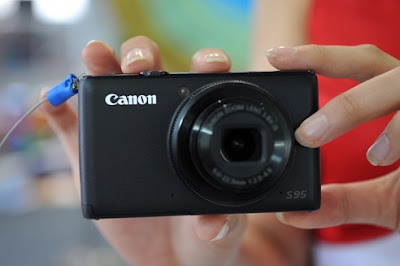
Canon S95 review -  Rich feature for general people

Powershot S90 is regarded as one of the most successful models of Canon compact few years. At the time the new release (August 2009), S90 is like a breath of fresh air into the tourism market advanced camera equipped with advanced integrated in a stylish slim body with quite a price reasonable if compared with the Panasonic LX3 or Canon G11.

In this debut, though not much improved compared to configure important series lead, but successors S95 version has attracted much attention due to have overcome some inherent disadvantages s predecessor while expanding the feature set with greater ability to customize.

Canon Powershot S95 impressive sight than the first by delicate design on the elegant black painted background. Compared to competitors Panasonic LX5 , machine is light and more compact, quite easily be tucked into pants pocket when going away. Similar  predecessor S90, the front of machine is polished to create a serene feeling but causing slippery when your hands too much sweat. Optical structure occupies a lot more area due to shoulder Control Ring ring with split-level, quick to adjust exposure parameters, aperture, ISO, clearing Ev, manual focus, white balance .. . Users can set up additional features for this ring by pressing the Func Ring next to the machine. S95's flash is not turned on by a mechanical spring, as some older models of Canon, which is controlled entirely by electronics inside the motor. Thus, users have access to the menu displayed on the LCD screen to be able to perform the basic operations such as on / off or adjust the brightness of the lights ... Add another inconvenience is that when activated, lights will pop-up jump up and occupy a large space at the left edge machine. Otherwise noted, spleen index finger on the front cover will take a huge flash of light each at close range.

Canon S95 review -  Rich feature for general people

Control systems are not much different version of S90. Position the keyboard at the back is pushed back down a bit to make room for the thumb. External effects to boot directly to photo mode, shortcut keys also allow a set of 12 features that the machine supports. Normally, users should be assigned to the key feature film to not have to waste time on disc wear scene selection Mode Dial. Rotation around the four navigation keys also allow quick change some parameters in the process of taking effect while scrolling menus and browsing images in playback mode. LCD screen remains 3 inches in size with resolution of 461,000 pixels in 4:3 ratio. With anti-glare technology of PureColor II, capable adjust the contrast is quite flexible, users can freely view and photograph the sun without fear of being affected by the deviation angle or excessive light phenomena .

S95's lens with focal range of 28-105mm zoom range equivalent to 3.8 x. Compared to the "supper" Leica Vario-Summicron on LX5 equipment, steam restrictions on the ability to shoot wide angle but good to telephoto. Large f/2.0 aperture with anti-vibration system effective hybrid Hybrid IS effective in capturing low-light situations, to lower shutter speeds without raising ISO to be too high. RAW image files trials showed that lens for ultra sharp images on any set focus and aperture. Wrong color appear a bit on the edge of the object image with the contrast a large but almost negligible. However, quite severe distortion (3.5%) in the most wide-angle 28mm equivalent focal length. If you choose to save as JPEG, it will automatically remove this error so the user does not have to bother to use specialized software.
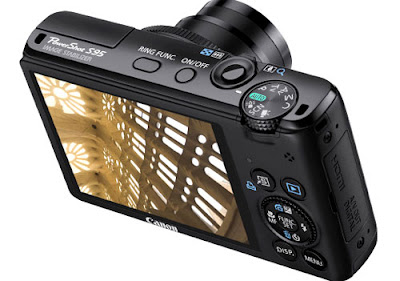

Canon S95 review -  Rich feature for general people

CCD sensor equipment on the S95 is not much different from the old version with the effective resolution of 10 mega pixels and the size 1 / 1, 7 inch. ISO range of change machines in the range from 80 to 3,200, up each step 1 / 3 Ev. In addition, the S95 offers a unique mode to enhance sensitivity up to 12,800 values. At ISO settings below 400, the machine for fairly smooth images with bright colors but not too bright as the Panasonic LX5. However, the S95 proved more vulnerable than competitors in the representation of reproduction of the details as dark on dark red background. According Resoure Imaging, noise reduction capabilities of the S95 is marginally better, "predecessor" a bit. ISO sensitivity at 800 and 1600, the machine still shows a few small details remain separate while the contrast is rather dim and faded, like the S90. When increasing the ISO to 3200, so many images can only be a small print in case of emergency.

Ability to satisfy, Canon S95 proved slow in quite application mode. Waiting period between two adjacent images of up to 2.58 seconds. In return, when I switch to continuous shooting mode, the speed jumped to 1.9 images per second with a JPEG file, double the amount of S90 but still inferior opponents LX5 with 2.5 of a second. However, the S95 buffer allowed to take 20 photos at a resolution of the best compression and quality, more profitable rather than the number 3 of images by LX5 . Shutter lag in full light conditions at about 0.096 seconds, pretty good with a camera model as the S95 travel compact. However, the waiting time is disappointing in light as its predecessor, up to 6 seconds if the generating capacity located in the most powerful.

Canon S95 provides abundant features for power users even express creativity. Repository of machine wear scene 18 pre-programmed shooting modes, such as basic portraits, landscapes, children, flowers, beach, fireworks ... Remarkably, the digital filter on the S95 also allows to create special effects such as miniature scenery, simulator fish eye or nostalgic coloring.

There's also the HDR mode to create a single image with a very wide contrast range, useful when shooting landscapes and portraits of the sun. With other treatment methods on the RAW files which are complex and inefficient, Canon S95 chosen solutions capture three consecutive images of the same object but different exposure time and then merge them to reach for a picture HDR literally. Users can combine a number of color effects and images in the HDR mode to produce works rich in creativity. However, this disadvantage can not be obtained when the object moves in the process of capture and total time from pressing the shutter button until you get HDR image up to nearly 6 seconds.

Canon S95 review -  Rich feature for general people

In addition to the preset shooting modes, S95 also offers manual control mode TV, AV and M is for experienced users.

Another improvement is very welcome that the machine has the ability to support 720p HD video higher than VGA resolution on S90 and its predecessor, "brother" G11. However, the scanning speed has been pigeonholed at 24 frames per second with no more options. Output file is encoded in H.264 standard combines high-quality stereo sound.


With a price of about 399 USD, Canon S95 is not a bad choice for those who need a compact machine travel light but still require high image quality and feature sets. Compared with the first version, the machine has to overcome the fundamental weaknesses related to response speed and shooting ability but with no real innovation in terms of technology inside and outside design. So, if economic conditions do not allow, you can choose the model S90 with lower prices.

You can see more detail technical this camera in Amazon(this machine in top 20 Popular camera in Amazon) : Canon PowerShot S95 10 MP Digital Camera with 3.8x Wide Angle Optical Image Stabilized Zoom and 3.0-Inch inch LCD

or You can find old version but it's very good for all: Canon PowerShot S90


Monday, October 11, 2010

Toshiba Portégé R700 - slim and good battery

Toshiba Portege R700 impressive lightweight design, convenient optical drive, good battery life though is not really good radiate heat.

Toshiba Portégé R700 slim and good battery

Portégé R700 is one of the strategies all the latest Toshiba laptop aimed at high-level segment for local entrepreneurs. This model is currently the laptop screen the world's lightest 13 inch, with 10 grams lighter than the most advanced model of Sony, Vaio Z. Opponents of the R700 can be told to Lenovo ThinkPad X series or the Sony Vaio S series.

Portégé R700 equipment configuration includes an Intel Core i5-520M-speed 2.4 GHz, 4GB RAM, HD Graphics Intel graphics chips, 500GB hard drive with shock protection features, optical drive read / write DVD.

Version is configured as above (code-01L01M PT310L). Two versions included Portege R700 (PT311L-02R00S) higher with 3G connectivity and GPS navigation capability. Portégé R700 is the cheapest version (PT314L-016 013) reference price of about 26.1 million (excluding VAT) is only a year global warranty, while the two versions are 3 year global warranty.

Design, Keyboard, touchpad

Design

Clearly define their target clients should Toshiba R700 is a very simple design with a black crust magnesium alloy honeycomb grid and still scratch luxury. In particular, by introducing and testing of the manufacturer, R700 has the durability to withstand considerable impact when dropped from a height of 76.5 cm or bear weight up to 100kg on a computer override.

Toshiba Portégé R700 slim and good battery

In addition, only 1.36 kg weight is really ideal for business people, who often have to work with computers and treat it like inseparable thing.

Design small, thin and ultra light, but R700 retains its advantages with equipment with an optical drive in handy. This is also the lightest world  with 13 inch laptop optical drive .

Also, there are almost the port is currently used as HDMI, eSATA, VGA, LAN, memory card reader. However, only the number of USB ports in the two figures can not fully satisfy many prissy users .

Keyboard, touchpad

Ignore the design of their traditional, Toshiba has equipped the R700 chiclet keyboards handy with good key spacing to avoid user input error. Magnitude and bounce of the keys also feel comfortable to use even for long periods.


R700's touchpad is quite responsive, meeting certain degree of surface area to facilitate user operations more accurately. The motion sensor support of this touchpad also done well.

Monitor, performance

Monitors

Portégé R700 equipped with LED-backlit screen size 13.3 inch resolution standard WXGA 1366 x 768 pixels, 16:9 aspect ratio. Unlike most current model laptop computer, using R700 anti-glare screen display instead of mirrors.

Experimental fact that, when used under sunlight, the screen still displayed good images without causing difficulties for users such as the mirror screen. This is one of the major advantages that this model will "popular with entrepreneurs", who often have worked in many different lighting conditions.

Performance

Portégé R700 equipped with LED-backlit screen size 13.3 inch resolution of 1366 x 768 pixels with the hardware configuration includes an Intel Core i5-520M-speed 2.4 GHz, 4GB RAM, graphics chip Intel HD Graphics, 500GB hard drive.

Toshiba Portégé R700 slim and good battery

Scoring systems to Windows Experience Index.

With hardware like this, this model achieved 4.5 points (get low score by clicking the graphics capabilities for Windows Aero) in the system when the spots on the Windows Experience Index Windows 7. On a scale of detail, to reach 6.7 point processor, RAM memory is 5.9 points while the graphics capabilities of 4.5 points and graphics for the game at 4.9 points.

Toshiba Portégé R700 slim and good battery
Machine reached 1361 points for 3DMark06.

Meanwhile, if using 3DMark06 score program to test the power of graphics, Portégé R700 reach 1361 points. This is easily understood by machines using only Intel integrated graphics chip HD Graphics and higher than average level of 1,000 points in the laptop does not use discrete graphics.

If using PCMark Vantage program (the operating system used 64 bits) to assess the overall machine, the machine reached the 5475 point scale as detailed below.

Gaming

Scoring machine with the program overall PCMark Vantage.

Do not play games designed to test, so when asked to play some games like PES2010 average graphics, the machine can be played only at the lowest setting "Low" and the rate stabilized at 41 frames per second.

Toshiba Portégé R700 slim and good battery
 Test drive results in HD Tune Pro 4.5 program.

Test the reading speed of 500GB hard drives have an average reading speed is 64.7 MB / sec compared to approximately an average of around 60 MB / sec in most current laptop hard drive for now.

Evaluate the processor with the latest programs Cinebench R11.5.

Continue using Cinebench R11.5 program to evaluate the latest Intel Core i5-520M 2.4 GHz speed, computer results as shown above.

Thermal, battery, audio

Radiator


Portégé R700 equipped with a fan inlet at the bottom edge of the slot machine and a heat radiator on the left side. With this additional fan surface made of magnesium alloy honeycomb grid should you use to surf the web, use yahoo, photoshop or HD video, on your face virtually no heat up.


However, on the contrary, when the user put it on the thighs will face difficulties due to a slightly less hot but still at acceptable levels. In addition, a possible disadvantage is that the metal found at the edge of the slot machine next to the left radiator is very hot due to exposure to large and continuous source of heat. This edge is very close to the keyboard area, so it will cause problems if the user accidentally touching the keyboard operation.

Battery

Portégé R700 equipped with high capacity 6-cell battery included. To fully charge the battery while using this, users need some time around 3 hours 20 minutes from the pin to 8%.

Tested: Firefox 10 loading site and automatically reloaded every 15 minutes, add a page to open online music and for continuous playback using headphones instead of speakers and to the volume at 70% level 50% light machine run until it automatically shut down (the 5% level), the time it reached 3 hours 58 minutes.

Meanwhile a treadmill test for HD movie playback 720p and continuously until the machine is off, is turned on Wi-Fi, instead of using external speakers and headphones at the volume level to 70% ( audio Windows Media Player program to 100%), 50% brightness until the machine runs itself off (also at 5% battery), the time is reached 4 hours 6 minutes.

Although not so prominent, but the time machine's battery life is still the dream of many other laptops, is also an important advantage when the user is directed to business people.

Audio

Because the product line for business people, so it seems capable of entertaining Portégé R700 is not paying much attention. Speaker of the computer system is quite bad, sounds pretty small, treble and bass are not clear.

Part 4: Comparison with some other model

Comparison with other models.

R700 competitors on the market today may be mentioned as the Lenovo ThinkPad X201 or Vaio S series, all targeting to the business user. These models are configurations including Intel Core i3, i5, from 2GB RAM, 250GB hard drive from above.

Pros about the video card can be considered Vaio S dominates the use of Nvidia graphics card, so the ability to handle graphics tasks will certainly better the two models remains to use the integrated Intel chip.

However, R700 and takes up a lot of advantages with weight and thinness, one of the top criteria when choosing a business machine. However, heat dissipation capability is not possible to have R700 that study compared with the Lenovo ThinkPad X201.

Also, both R700 and Vaio S series also has an optical drive in together, preferably than the X201 model.


You can see more detail technical this laptop in Amazon : Toshiba Portege R700-S1320 - INTEL - CORE I5 - 520M - 2.4 GHZ - DDR3 SDRAM - RAM: 4 GB Toshiba Portégé R700 slim and good battery


Thursday, October 7, 2010

How Full Is Your Bucket- The book help you know more things about life

Maybe one of us has ever loved and could have hurt or caused harm to someone. At such times, we all must have felt heavy heart and much concern. We all know, the life of every person is formed through a series of relationships in social interaction, but not everyone knows how to adjust the attitude to this relationship as what you expected ....
How Full Is Your Bucket- The book help you know more things about life

Might say, in each of us lies a "bucket" invisible. It is filled or empty depending on the behavior of those around us and vice versa. When the "bucket" is full, then we feel very comfortable and pleasant but when it's empty, I would feel really bad life.

Each of us who also have a "scoop" invisible. When using "the scoop" was filled "bucket" of others - by words or acts evoke positive emotions in them - the same time, we are filled "bucket" of them. But when we use "the scoop" to dry the "bucket" of others - by words and actions to reduce their positive emotions - then we are going to do with "bucket" of happiness themselves.

As the god of rice pots in the ancient story, "bucket" full of offers and we look at the positive joy of life every day. Each drop of water in the "bucket" that makes us strong and live more optimistic.

In contrast, the "bucket" made me feel empty pessimism to the world, got tired and did not want to strive for the future. That is why every time someone with a "bucket" of our emotions, we feel hurt and pain.

Every day, we always have two choices: either filled or made of another bucket not to be full. Each choice will deeply affect relationships, work productivity and health and our happiness. So, make your life as well as everyone around by a better choice!

With gentle style, with simple metaphorical way of valuable practical experience for over 50 years of research by the author, the book "How Full Is Your Bucket" not only help you to understand the interactive effects of attitudes life to social relationships, productivity, health, and age of human but also give you methods to strengthen the positive moments in your life, improve labor productivity as well as limit the influence of negative factors for each person. Sure you'll have more interesting discoveries when you read this book.

Science and real life was more convincing evidence of the importance of positive feelings for human life. So why do not we take advantage of every opportunity to strengthen positive feelings for themselves as well as for those around you? Many big difference is waiting for you to explore.

Do not waste another moment. A "bucket" feelings somewhere waiting to be filled!

You can see more detail this book in Amazon : How Full Is Your Bucket? Positive Strategies for Work and Life


Wednesday, October 6, 2010

An easier way to use Google Latitude on your computer

We’re happy to introduce an easier way to use Google Latitude from your computer at google.com/latitude. You can now see where your friends are, start using Latitude apps, and share your location all from one place when you’re at your computer.

Find your friends
We launched Latitude with a desktop iGoogle gadget to help you stay in touch with friends and family that may not have a smartphone. We’ve since learned that a desktop experience is important to you even if you’re already using Latitude on your phone. Today, you can now visit a dedicated site that makes it easier than ever to use Latitude when you’re already on your computer. From the Friends tab, you can:
  • See where your friends are on Google Maps
  • Add friends and accept sharing requests
  • Control your privacy settings


Do more with Latitude
You’ll also now find Latitude and Latitude apps together in one place. After browsing your friends list, go to the History or Apps tabs to turn on optional Latitude apps such as:


Share your location
Just like on your phone, you can choose to share your location with friends and family from your WiFi-enabled computer. Before you can share your location, you’ll need to first give Latitude permission to access your location when prompted by your supported browser. You can always change your browser or Latitude privacy settings later. Learn more in the Help Center.

To get started, go to google.com/latitude on your computer. If you’re new to Latitude, you can then start on your phone by sending yourself a text message or choose to start on your computer.

Tuesday, October 5, 2010

Open your eyes: Google Goggles now available on iPhone in Google Mobile App

Searching with Google on your mobile phone can be an eye-opening experience. Now your phone’s camera can even help to find out more about the world around you.

Back in December we introduced Google Goggles on Android: it lets you search by taking pictures. Today, we’re excited to announce that Goggles is now a feature of Google Mobile App for iPhone. Google Mobile App already lets you speak your queries, and it can also use your phone’s location to give you more relevant search results.


In the new version of Google Mobile App just tap on the camera button to search using Goggles. Goggles will analyze the image and highlight the objects it recognizes -- just click on them to find out more. You can see how this works in this short video:


Computer vision is a hard problem and Google Goggles is still a Labs product. It works well for things such as landmarks, logos and the covers of books, DVDs and games. However, it doesn’t yet work for some things you might want to try like animals, plants or food.

Google Mobile App with Google Goggles is now available in the Apple App Store. Just search for “Google Mobile App” and download the latest version - it’s free. It will gradually be appearing in all App Stores around the world starting from today.

Goggles is enabled only for English-speaking users, and since it requires an auto-focusing camera it is supported only on iPhone 3GS and iPhone 4 running iOS 4 or above. Visit our Help Center to learn more or send us your feedback and questions in our Help Forum.

So step away from your computer, get your Goggles on, and search the world around you.

Sunday, October 3, 2010

Panasonic LX5 - the best camera in travel line

After the success exceeded expectations LX3, Panasonic released LX5 with some improvements we hope to continue the ladder of fame for the company.

Panasonic LX5 - the best camera in travel line

Continuation of the cult series LX3, Panasonic LX5 launches with some new improvements, especially the additional support electronic viewfinder and ISO is pushed up to 12,800 (compared to 3200), an ideal figure for people who have taken the night. Is designed with 3-inch LCD screen 460,000 pixels, the sensor 1 / 1, 6 "resolution 10 million pixels and wide-angle 24mm tube, but LX5 is a little longer telephoto range even negligible (90mm compared to 60mm) and support the AVCHD format when play HD video 720p .


LX5 hold solid hands through the crust-metal design. Although the handle has been improved, but by design oriented compact pocket it is not enough certainty. The whole front of the lens ring is fixed with custom focusing manually or automatically, the ratio of 4:3, 3:2, 16:9, and 1:1 (new compared to the LX3). Contrary to the front was fairly clean design, and later on Panasonic crams a lot of function buttons. In rotation mode on allowing quick access to shooting modes PASM and custom or default user context. Besides the power switch and camera button / zoom ring is a direct video recording button, light switch instant recording mode even if the machine is in any mode. Flash as the knob is hidden at the side and can be activated manually through the switch instead of automatic. Pin external flash slot is shared with the frame assembly of the GF, but the default is covered by a lid included.

The back outside the large LCD screen is the Menu button access and quick access keys to adjust ISO, flash, self-timer or Fn button can assign different more customizable. There are two new points worth of improvements compared to the LX3 LX5. First is the button joystick has been replaced with round circle and adjusted as the DSLR can click on the lines similar to GF, quite useful when used to adjust aperture and shutter speed in manual mode or aperture definition and exposure compensation in other modes. However, this rotation is designed to rotate causing deep make to turn around and press are also not favorable. Monday to include the transfer switch between shooting mode and view buttons have been replaced by electronic watch. This design allows users, including viewing photos can also quickly switch back to shooting mode by simply pressing the shutter button instead of the home switch must be changed quite confusing as the LX3.

The port side must also be minimal as only 2 HDMI ports and USB ports. Underneath the base is the common slot with room for batteries. The tripod socket layout differences aside even a little inconvenient when mounted on the small tripod (so easy to pour) but also present useful when users want to change the battery or the card even when the motor is mounted on legs that no effect.

LX5's menu system allows users to customize interventions in many different but the layout on the screen quite tangled and complex enough to dizzy new to the camera the first.
Panasonic LX5 - the best camera in travel line


LX5 lens continues to impress with a strong class from Leica lens (Vario-Summicron) and large aperture of f / 2. Maintains a wide-angle 24mm, zoom range LX5 is the last little more than its predecessor, up to 90mm, more ideal for portraits. Although not large zoom range, but still equipped LX5 system MEGA OIS image stabilization to ensure a new photo or video is always low sharp as possible. Along with improvements from ISO 3200 in LX3, LX5 supports up to ISO 6400 and 12,800 without through a regime expansion. Combined with large aperture, LX5 ensure any photograph in any low-light situations.

But the LX5 noise levels treatment did not overcome the limitations of digital camera usually travel. By 3200 picture is still acceptable. But as they continue to push up 12 800  or 6400, images broken completely, colors are stick and details are lost. But for those who just need the material pictures, that high ISO is an advantage when LX5  is possible that  scene motion even when the image is dark in the form of "use."

Color photographs showing smooth, low noise, including noise and color noise when the ISO is to 80, a relatively low level compared to the ideal level of default ISO 100 and 200 of the most current travel camera . Thanks to the large aperture of f / 2, the portrait or picture life in daylight conditions to launch large-scale problems is not difficult for this edition.

New zoom system of LX5 super quiet but firm called Intelligent zoom proved very useful, quiet operation almost sounds like digital zoom, so users can take advantage of this optical the film without fear of impact noise. In addition to Motion JPEG format common been saved 720p HD video with a compact AVCHD Lite format. Only thing to read this format, users must connect the camera to the computer and read in its software rather than copy and read from the card reader is common. In return, with integrated software, users can save images from video and editing simple videos right on your computer just recorded without a computer.
Panasonic LX5 - the best camera in travel line

With a compact design, advanced features with many different custom, the LX5  contribute segments to the advanced camera tourism replacement for DSLR  next the version the G12 of the Canon or the NEX and the new NX Sony and Samsung. But with prices still relatively expensive, equivalent to a DSLR popular (about 400 USD) while the high ISO advantage was not shown his class, LX5 less prominent compared with other the other advantages available the famous Leica names and LX3 ago.


Friday, October 1, 2010

Car Home for Android Gets Personal

Car Home for Android turns your Android phone into a better driving companion by providing you with quick access to key applications on the go: GPS navigation, voice-activated commands, contacts, and more. Today, we’re releasing a new version of Car Home for Android (Update: currently for Nexus One and Motorola Droid, only) which makes it easier to customize Car Home to get the information you need faster.

Now, you can also quickly customize the shortcuts to personalize Car Home with one-touch access to apps and information on your phone. Just select one of the icons marked “Add shortcut” to start creating your own shortcuts. You can also drag-and-drop or remove shortcuts by long pressing any of them.


You can launch Car Home by opening the app directly from your phone or docking your phone in a car dock, and now you can automatically switch to Car Home when your phone pairs with any Bluetooth™ device. Simply select “Settings” from the Car Home screen and select which of your paired Bluetooth™ devices you want to automatically trigger Car Home.

Want to customize Car Home even more? You can now set your own wallpaper for Car Home. Just select “Settings” in Car Home and choose a wallpaper that fits your tastes. You can also customize the color of the shortcut icons to really make the Car Home experience your own.


We’ve also made it simpler for Android developers to modify their existing applications to be compatible with Car Mode. Apps which support Car Mode will show up in a “Car applications” category so they can easily be identified by you and added as a shortcut.

The new version of Car Home for Android is available for Android 2.2. You can get the update from Android Market by searching for “Car Home” in Android Market or tap here on your Android device.

Don’t forget, while your Android-powered companion can assist you while you drive, please keep your eyes on the road and drive safely at all times!

Update 10/1/10 10:28 PST: The new Car Home is available for Nexus One and Motorola Droid. Visit our Help Center to learn more or send us your feedback and questions in our Help Forum.

Posted by Markus Mühlbauer, Manager Engineering & Product, Google Automotive

Followers

Search This Blog

Get Paid To Promote, Get Paid To Popup, Get Paid Display Banner

Preview on Feedage: super-smart-gadget Add to My Yahoo! Add to Google! Add to AOL! Add to MSN
Subscribe in NewsGator Online Add to Netvibes Subscribe in Pakeflakes Subscribe in Bloglines Add to Alesti RSS Reader
Add to Feedage.com Groups Add to Windows Live iPing-it Add to Feedage RSS Alerts Add To Fwicki
Feedage Grade A rated Powered by Mysiterank Dr.5z5 Open Feed Directory Subscribe My Feed Technology