Pages

Monday, May 10, 2010

Sony Ericsson Xperia X10 reviews - power and modern for men

Xperia X10 is beautifully designed with many features glitter well be announced from last year, after several rumors as X3 or Rachael. After nearly half a year, months, X10 appear on the market. 

Here are the most significant point of this super product.

Sony Ericsson Xperia X10 reviews - power and modern for men
  • Size: 119 x 63 x 13 mm, weighs 135 grams.
  • OS: Android 1.6 (Donut) will be upgraded to version 2.x in the second half of this year.
  • Connectivity: 3G/HSDPA, HSUPA, Wi-Fi, Bluetooth with A2DP, GPS with A-GPS.
  • Display: 4 inch, 65 thousand colors, resolution 854 x 480 pixels, sensor capacitance.
  • Memory 1GB, 384MB RAM, microSD card slot, 8GB memory card included.
  • Processor: 1 GHz Qualcomm Snapdragon QSD8250.
  • Camera: 8 Megapixel with auto focus mode, LED, face recognition mode, focus point, video recording WVGA (800 x 480 pixels), 30 frames per second.
  • Interface:Sony Ericsson Timescape and Mediascape, rotating screen mode.
Design
Sony Ericsson Xperia X10 reviews - power and modern for men

Looking from the front or the next will see the X10 looks strong with the angular line, personality, however, at the rear, machine becomes soft by the curve, especially the battery cover.

Machine size 119 x 63 x 13mm, weighs 135 grams, the design is considered quite large, but the touch screen capacitance up to 4 inches. So the super-hd2 HTC products (120.5 x 67 x 11 mm, 157 grams) lighter than the X10, but quite thick, well on hand held machine men, but can be a barrier to female users.

4-inch wide-screen resolution of 854 x 480 pixel, WVGA be classified into standard, but unlike the standard 800 x 480 pixel normal. This design makes the X10 display is longer than other phones, but the basic applications, as well as new software installed on without any change.

X10 only three hard buttons below the screen, including menu, return to screen Home and Back to return to the page. Power button, 3.5mm headphone jack and microUSB port is put up top, while the volume keys adjustment and take photos  is next.

X10 bit difficult to remove the battery cover, if not familiar. MicroSD memory card slot of the machine are arranged in the battery cover, machines with the 8GB card.

Features and user interface

Sony Ericsson Xperia smartphones that are strongly connected model. X10 is not the exception, computer support HSPA, Wi-Fi, Bluetooth, GPS.

Devices running Android OS 1.6, features included are built like Gmail, Google Maps and Google's YouTube, and applications support Microsoft Exchange Mail Moxier.

Unlike other phones running Android from HTC and use interface Sense, Sony Ericsson has launched Timescape interface and features on the X10 Mediascape. Outside of the computer screen display information network, time, date, status, wave and pin messages. Open your lock (unlock) on the slider support a cross, the selection slider to left or right depending on which user-handed.

Sony Ericsson Xperia X10 reviews - power and modern for  men
Timescape interface

Timescape the X10 interface is quite simple slider with a horizontal bottom, allowing the applications to the Listen to music, Twitter, Facebook ... above the 3D images are arranged together to allow her husband goes to each site and application specific.

However, can see only Timescape interface looks flashy, but not deeply interfere in the Sense. One example is when click the icon status updates on Facebook, it will automatically go into the mobile browser versions, not a separate window to work.

There are sometimes similarities widgets on your phone TouchWiz Samsung, X10 fairly simple interface, this model is based more on the Android platform available.

Sony Ericsson Xperia X10 reviews - power and modern for men

Meanwhile, the interface Mediascape to support features such as listening to music, video, photos. The multi-media entertainment files may be located on the memory card, or online. To download music, to the apparatus with PlayNow music store, while viewing images, users can link to the album on Facebook, Picasa, Flickr.

Web browser based on WebKit, supports the opening page on 3G connectivity, Wi-Fi like iPhone's Safari, with the ability to move, drag-and-return elasticity. Unfortunately, machines do not have multi touch when browsing or viewing pictures.

X10 has 8.1-megapixel camera with LED light support, which, camera interface is quite easy to use. HP support features such as facial recognition, touch screen to focus. Just took your picture is saved as a bar. X10 for better picture quality and true, if compared to the phone today, especially the picture taken outdoors.

Rate

Sony Ericsson Xperia X10 reviews - power and modern for men

1GHz Snapdragon processor allows the use of applications, especially software related to the image is smoother. Machine for better call quality, clear. However, the battery is not the strongest point in the trial process, about 1.5 on the need to charge, though only run applications conversations, e-mail basics.

Sony Ericsson has announced, X10 will be upgraded to version 2.x Android (probably 2.1 or higher) and the second half of this year. Many hope, new software will improve the interface and the ability to support multiple locations.


You can refer to : Sony Ericsson Xperia X10 Android (Black) Unlocked, International Version with No Warranty


Friday, May 7, 2010

Sony Ericsson Vivaz reviews - Power of entertainment

With 8-megapixel camera,  video recording HD 720p, Sony Ericsson Vivaz also supports auto focus. Machines running on the Symbian operating system for smartphone sensors.

A year ago, Samsung Omnia i8910 HD model is the first open revolution with 720p video recording capability. This year, Sony Ericsson also began to market  Vivaz with the same capacity.

Sony Ericsson Vivaz reviews - Power of entertainment

The most notable feature of Vivaz:

- 3.2 inch screen, 16 million colors, resistance sensors with resolution 640 x 360 pixels.

- 8 Megapixel camera with auto focus capability, LED, mode face recognition, smile, touch focus and Geotagging.

- 720p HD video, 24 frames per second.

Symbian OS September 4, S60 version 5 interface with customizable Home screen, the recreational orientation.

- 720p processor, dedicated graphics PowerVR SGX.

- 3G connectivity with HSDPA 10.2 Mbps, HSUPA 2 Mbps, Wi-Fi, GPS with A-GPS.

- MicroSD memory card slot, rotate the screen, stereo FM, TV-out, web browser supports flash full.

Design


Sony Ericsson Vivaz reviews - Power of entertainment

First impression with Vivaz is very neat design. Machine have smallest and lightest model compared to the HD or Satio Omnia Sony Ericsson. This was confirmed by increasing the ball's surface and covers the following seven with two sharp bends. Machine with the plastic, but the surface of the ball as easily in fingerprints.

Vivaz wide screen 3.2 inches, resolution 640 x 360 pixels, the possibility impressive contrast. The use of mobile technology resistance. Buttons on the front of key calls and disconnect calls, in between the Menu button.

Left edge device is connected micro USB port for charging, synchronization, right next to the 3.5 mm headset jack, it is well equipped for those who listen to music. At the next rest, is used to photograph, film button.
Machine also has memory card slot, which features behind the battery cover. With only 75MB of internal memory, the fitted expansion slot, allowing Vivaz store photos and other entertainment content multimedia well.

8-megapixel camera is of special Vivaz behind, and no cover to protect like Satio. This design helps to slim and more beautiful machine, but users will have to be careful with the camera over the surface.

Features

Vivaz almost fully connected, from HSDPA, Wi-Fi, Bluetooth with A2DP, DLNA, the TV-out and GPS (with A-GPS) support GPS.

The new mobile is equipped with Sony Ericsson Symbian OS S50 version 5, like Omnia HD and Satio. A Home screen allows users to quickly favorite contacts, Internet bookmarks, photo gallery and new Twitter updates. Machine also supports options such as search, the program goes to play music, send messages or call pretty quickly.

Sony Ericsson Vivaz not use Home screen traditional S60. One favorite is equipped with a web browser of your full flash support, which means users can view the video content as well. Not support multi-point, but let Vivaz pull, elastic slider on the browser, tap twice to zoom in, zoom thumbnails beyond the bar.

Vivaz no front camera, although this model supports 3G, users will not make the video calls.

Application on Facebook allows users to update status on Wall, view photos, albums, messages and search your friends. This is a simple application, which was installed before, but sometimes for Facebook Vivaz slow, especially when down.

RoadSync on for connecting to Microsoft Exchange Server, support services pushmail, map of calendar, contacts well, this is the application support for the job. Meanwhile, on the Quickoffice software only allows reading text, to upgrade can be drafted, users need to pay additional fee.

Machine install additional applications like Wisepilot GPS, Google Maps. Model does not have the compass, although this is often a feature on phones running S60 version 5.

Camera

Sony Ericsson Vivaz reviews - Power of entertainment

Undeniable, equipped Vivaz most famous is the 8-megapixel camera, video support 720p. Also, unique features also enable auto focus or pause this mode is more filming.

Tests showed that the ability to film, self-focus of your impressive. It only takes 2 seconds to adjust, in addition, images back from this model with 24 frames per second and the sound quality better than HD Omnia.

Imaging screen with control buttons are two sides, while shooting 8-megapixel resolution, 4:3 ratio display machines, and 4/5 of the screen while shooting 6-megapixel resolution, machine will display full screen with 16:9 ratio.

Two keys imaging and video separately, the user easily select a work with the camera. Custom Khuông identified as face, smile, touch to focus easily customized. In addition, the machine also features photography add geographic location.

However, users do not choose ISO, aperture and shutter speed. Video allows recording in 720p resolution, VGA, QVGA and low mode to send MMS messages. When finished recording, you can download directly to YouTube to share. While the return may be shot.

Assessing performance

1200 mAh battery, this model allows conversations on 2G continuous 13 hours, while the time regime stanby is 18 days. Meanwhile, normal use, always turn pushmail mode, allows computer users about two days.

Sound quality from this model at moderate, not excellent. However, listening to music through headphones on the headphone jack better.

Vivaz is considered a real rival for Omnia HD, both run S60, film 720p, but the interface is different, while Sony Ericsson mobile screen directions to Home, the additional HD Omnia widgets .

Maybe, Vivaz will love about video recording capability, quality and custom, especially focus automatically, but consider the factors and entertainment equipment hardware, Omnia HD superior  .


You can refer to:  Sony Ericsson Vivaz U5i (Black) Unlocked, International Version with No Warranty


Thursday, May 6, 2010

Strongly And Weekness About Nokia N97

Strongly And Weekness About Nokia N97

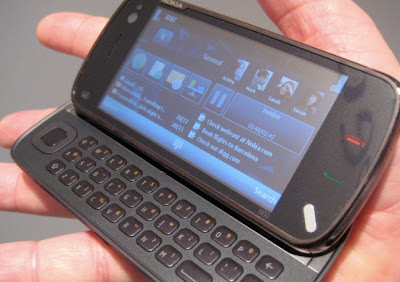
N97 is the latest multimedia phone made by Nokia. Design and features that bring a combination of entertainment and business concept is to combine interfaces and interactive touch qwerty keyboard is comfortable to use. Design that brought the Nokia N97 is the first design from Nokia that combines touchscreen display with qwerty keyboard. Although many mobile phones already in the market now use these concepts. With the presence of qwerty keyboard makes this phone not only as a multimedia phone but this phone could be called a mobile office (office).

Here Pros Cons Nokia N97:

Excess Complete
1.Berfitur
2.Mempunyai wide touchscreen display that is 3.5 "
3.Mempunyai qwerty keyboard
Slidernya
4.Mekanisme convenient to use
5.Menggunakan glossy plastic material and the metallic part of face so it looks luxurious
6.Mempunyai large icons so easy to be accessed using your fingers
7.Mempunyai shaped stylus dongle
8.Mempunyai 5 megapixel camera with Carl Zeiss optics Tessar lens and comes from autofocus and dual LED menghasilakn fota quality.
9.Mempunyai good sound quality for stereo speakers equipped with two separate funnel.
10.Sudah integrated with OVI services
11.Koneksi very complete: Bluetooth, data cable, WiFi, and HSDPA access
12.Mempunyai browser view very interesting and supported with a wide touch screen.

Weakness
1.Layar touch less responsive when compared with those of the iPhone
2.Mempunyai expensive price
3.Berat
4.Back Cover with plastic material with a layer of marble makes it easy to be scratched
5.Tidak no smart dial
6.Koneksi content is often problematic

Conclusion
Although it has some weaknesses that have sometimes cumbersome and expensive prices, but will not reduce the greatness and completeness of features brought by this phone.

Translate the real world with Google Goggles

Traveling to another country can be an amazing experience. The opportunity to immerse yourself in a different culture can give you a new perspective. However, it can be hard to fully enjoy the experience if you do not understand the local language. For example, ordering food from a menu you can not read can be an adventure. Today we are introducing a new feature of Google Goggles that will prove useful to travelers and monoglots everywhere: Goggles translation.

Here’s how it works:
  • Point your phone at a word or phrase. Use the region of interest button to draw a box around specific words
  • Press the shutter button
  • If Goggles recognizes the text, it will give you the option to translate
  • Press the translate button to select the source and destination languages.


Google Goggles in action (click images to see large version)


The first Goggles translation prototype was unveiled earlier this year at the Mobile World Congress in Barcelona and could only recognize German text. Today Goggles can read English, French, Italian, German and Spanish and can translate to many more languages. We are hard at work extending our recognition capabilities to other Latin-based languages. Our goal is to eventually read non-Latin languages (such as Chinese, Hindi and Arabic) as well.

Every new release of Google Goggles contains at least one new feature and a large number of improvements to our existing functionality. In addition to translation, Goggles v1.1 features improved barcode recognition, a larger corpus of artwork, recognition of many more products and logos, an improved user interface, and the ability to initiate visual searches using images in your phone’s photo gallery.

Computer vision is a hard problem. While we are excited about Goggles v1.1, we know that there are many images that we cannot yet recognize. The Google Goggles team is working on solving the technical challenges required to make computers see. We hope you are as excited as we are about the possibilities of visual search.

Google Goggles v1.1 is available on devices running Android 1.6 and higher. To download, please scan the QR code below or go to the Android Market app on your phone and search for “Google Goggles”. See our help center for more information.


Wednesday, May 5, 2010

Google's new look for mobile

When it comes to mobile search, we strive to not only give you the same comprehensiveness and relevance as when searching with Google on your computer, but also a consistent look, feel, and overall user experience. So today, as we roll out a new look for Google Search results on your computer, we are happy to announce similar changes to Google Search results for mobile.

When you go to Google.com in the US on your iPhone or Android-powered device, and enter a search, you can now tap on the button to the left of the search box on the results page to see a new search options menu. Then, selecting any item in the menu will refine your search. For example, if you are looking for recent results for "Mother's day gift", simply tap the "Past week" option.


You may notice that when the menu expands, the search results slide off screen to the right. Note that you can still interact with them and see them in full just by panning to the right. Also, there are some additional menu options, like "News" and "Products". In the weeks to come, we will be supporting more devices and locales, and expanding the number of options available.

Update on 5/7 @ 9:20 am: Note that Palm webOS is now supported as well -- as some of you have noticed.

Tuesday, May 4, 2010

Samsung F700 review - Nice mobile with more interesting app

With beautifully designed with wide touch screen interface features trendy and vibration sensors, however, Samsung F700 as a nice hard way by the user will take time to know.

F700 is Samsung's first phone equipped with 3.2 inch touch screen. This is a device many people do think of the iPhone.

Samsung F700 review -  Nice mobile with more interesting app

In the segment touchscreen similar to the iPhone, in addition to the Samsung F700 and F490, Sony Ericsson P1i also towards entrepreneurs, W960i Walkman phone music player and Motorola Rokr E6. Besides the fashion model mobile as LG Prada, Samsung Armani and LG Viewty. However, the F700 still have differences, that is horizontal sliding QWERTY keyboard.

Similarities between the iPhone and the F700 is a touch screen design and glamor, the bottom screen is a button center. When the impact on this key, it will appear the icon allows the user to select the function music player, phone, web surfing, instant messaging or on the main menu with the icon network.

Next to the machine, turn camera users to easily capture images, depending on volume or lock. Meanwhile, on top of the machine is turned down, power off, connect to a computer port and 3.5mm headset jack. The back of the F700, 3 megapixel camera support auto focus mode is next to the flash LED.

Samsung F700 review -  Nice mobile with more interesting app


However, the glamor of the F700 design is also very easy to stick to your sweat, your screen will not be protected safely when users pocket with other objects.

When you want to use QWERTY keyboard, users simply push the machine from left to. Quite smooth sliding mechanism, the transfer mode, the screen is automatically displayed to the horizontal format.

The square button on the keyboard is beveled corners aesthetic similar to the Apple MacBook laptop. Although the adjacent node is classified, but quite easy to use and very little press was wrong. Below the buttons is white black light lamps. Disposition of the F700 QWERTY keyboard is quite similar to Nokia E61i or Motorola Q9 h.

Running Croix interface, Samsung F700 does not allow installing additional software, machine features touch vibration, support high-speed connection.

Different from the i780 runs on Windows Mobile 6, Samsung F700 running on interface called Croix, like Samsung Armani. Platform running on F700 Croix seems only this device, because there is no more a utility that you can install add-on.

Interface with the original icon on relatively simple, but trendy. Users can easily impact by hand, select the applications or slide up and down in the phonebook.

F700's screen is equipped with vibration sensors feature. When the user impacts on the icon, the device will automatically vibrate slightly, as is the press on the keyboard. F700 allows custom rhythm and intensity of vibration.
Samsung F700 review -  Nice mobile with more interesting app

Unlike mobile QWERTY keyboard on the market, F700 has no joystick. Instead, they are individually designed and located on the keyboard. User will take some time to know, such as the one to back down from the last key on the keyboard to enter button to space.

If you're a frequent choice of synchronization between Microsoft Outlook on your computer to the phone, the F700 is not a good idea to do it. Synchronize data is incomplete and limited the number of messages when updating.

F700 runs on three GSM frequency band with HSDPA, Bluetooth (support A2DP), micro SD card slot expansion and three-megapixel camera to capture images for 2016 x 1120 pixels wide.

Samsung F700 equipped for 1000 mAh battery allows 4.5 hours continuous conversation and standby time is 12 days. Speakerphone on activities during the call well, though sounds a bit thin.


Saturday, May 1, 2010

Canon A3100 IS - New cheap model for family

Give up lumpish figure of line A, the line PowerShot A3100 IS  close to IXUS  fashion than by using compact lithium.


PowerShot A3100 IS is a version cheap for travel to basic parameters of 12.1 million pixel sensor, image processor DIGIC III, anti-vibration lens with 4x optical zoom and 2.7 inch LCD screen . Release replaces the A1100 IS, we can say this is the first line A has strongly retired from the AA batteries instead of lithium as other tourist lines. Larger screen by previous optical sight bracket should be removed also. Card slot is updated with the ability to support high capacity SDXC cards up to 32GB .

Same batch released this innovative line of A can also always the computer, including the A3000 IS, because the two virtually identical all parameters, except the A3000 IS has a lower resolution, only 10 million pixels.
Canon A3100 and Canon A3000

Do not use the battery should state in the shape of A3100 IS looks more compact, although the actual size and weight is similar. Left hand to the collapse than the A1100 IS does not make sense not so sure. The button layout is quite reasonable for your situation and adjust with one hand easily.

However roundabout in Edit mode on very hard, so to switch modes are best held hands. Although a bit inconvenient but designed to avoid this roundabout prone to move suddenly during influenza machine.

Although imaging button and power switch placed next to each other by design, but should work reasonably hard to press the wrong place. Zoom button instead of resolve in to button press the back , quite similar to the compact version of the Canon recently but may be more inconvenient for some people familiar with the mechanism dupe tradition.

The back button is also a little easier thanks to the removal button to print directly, perhaps because the period studied the market, Canon see some people do not use this feature. But to get familiar, the airline has arranged this feature built-in navigation buttons adjust the mode on the back.

Basically, the mode control is quite familiar with the Func Set button in the center of the ring to navigate, allowing access and change the parameters of film sensitivity, white balance, color correction, brightness, sequence or resize images ... Also helped the navigation buttons for quick access to exposure compensation parameters, lights, automatic capture and macro mode.

Compact flash to capture the far left corner for up to 4 meters. Through the transition to using lithium-time feedback so light has improved significantly with the slow speed of the line before are using AA batteries (sometimes to 7 seconds). Recovery time of the A3100 IS are located within about 3 seconds, longer if you switch to continuous shooting, the shooting can maintain lights at speeds of about 2 seconds / image.

However, switching to compact lithium line also revealed only one clear advantage in the recovery time lights, also other functions also do not have outstanding compared to previous versions. Duration of the battery is only about 240 types / times for charging, less than the predecessor, the A1100 IS and the same time the A490 IS and A495 IS.


PowerShot A3100 IS is equipped with a 4x optical zoom, equivalent to 35 - 140mm with aperture f / 2.7 to 5.5 anti-vibration mechanism and tradition of Canon optics. When boot lens out of about 24mm. Startup time which is about 2 seconds, not too fast but enough for most cases. Zoom is divided into seven levels with time from wide angle to full telephoto takes about 1.5 seconds.

The auto mode of the Canon works pretty perfect, especially the mechanism automatically Face Face Detection AiAF with very high adhesion ability. Although still limited in speed of identification in low light, but if more than faces (for example: taken collectively), the weakness also easily be overcome.

LCD screen on the A3100 IS in comparison with standard cameras now popular with 2.7 inch width and resolution of 230,000 pixels. Was eliminated by optical frame should watch this screen will play a vital role in taking photos of this model, so the screen is designed display good at all angles although still quite limited under sunlight directly.

Designed towards the user should simply preferred modes of automation A3100 IS up instead support the main features hand. Only the capture mode Program can intervene to parameters such as ISO, also the parameters of exposure will make the whole machine. Support the mechanism of this intelligent system automatically receive default Intelligent Auto scene.

In order to reduce the price to suit the average user of the object, although the new version is released but was able to remove HD video mode, instead of recording VGA standard mode 640 x 480 pixels at a rate of 30 frames per second. Compressed MPEG movies and save the common AVI format. Recording time is not limited to the full optical zoom and memory card is blocked when the film is activated, instead of using only the digital zoom.


Time sequence of versions A3100 IS in fact better than the specifications with the speed of 0.9 frames per second resolution and highest image quality (parameter of 0.8 frames / second). Unlike the mechanism of sequence of other manufacturers are likely to increase as lower-resolution version A3100 IS kept relatively stable rate in most resolutions. The continuous shooting mode in low light conditions (Low Light Mode), speeding up the camera a bit to 2.6 frames per second at a resolution of 2 million pixels.

On A3100 IS ISO range 80-1600, but no mode click on 3200 as a version number of this company. Shutter speed extends from 1 to 1 / 1500 sec and can last up to 15 seconds (in some modes).

When comparing the actual shooting at low ISO with two versions of the same level PowerShot A490/A495 and the Nikon Coolpix l22, A3100 IS results do not matter but not in the version now travel by Canon (the A490 is a typical example). In return, the colors shown in the panoramic scene and has been showing good crop though not sufficient clearness. With high ISO and light conditions indoors and one lens was extended, the quality of the A3100 IS can be improved even more still "below the" A490. At ISO 200 the quality, nothing censurable the noise under control quite well. ISO 400 noise starts to increase markedly over the color display is quite stable. From ISO 800 to 1600 particles is much noise and should be permanently taken in cases of real need.

A current version is the first to use lithium batteries instead of AA tradition, Canon PowerShot A3100 IS close to the IXUS line with the big screen and compact body. Unfortunately, the new battery also improve feedback speed of light, also is not revealing the premium features including Vietnam, especially when calculating the duration. Although the lens is not wide enough but also a range of government is quite reasonable and integrate the anti shake. As CameraLab, A3100 IS's image quality is even less than the same time, the A490 can say is too good compared to other competitors in the market, especially at the price announced only 180 USD.


Followers

Search This Blog

Get Paid To Promote, Get Paid To Popup, Get Paid Display Banner

Preview on Feedage: super-smart-gadget Add to My Yahoo! Add to Google! Add to AOL! Add to MSN
Subscribe in NewsGator Online Add to Netvibes Subscribe in Pakeflakes Subscribe in Bloglines Add to Alesti RSS Reader
Add to Feedage.com Groups Add to Windows Live iPing-it Add to Feedage RSS Alerts Add To Fwicki
Feedage Grade A rated Powered by Mysiterank Dr.5z5 Open Feed Directory Subscribe My Feed Technology